Essay · 2026-10-05
Does Serena actually improve your agent's efficiency?
A 550-task paired comparison shows how Serena influences agent behavior, cost and time.
What is Serena and why would I use it?
Most coding agents interact with a codebase through a small set of general-purpose tools like read, write, edit, grep. All of these tools treat code as a long string. Serena is an open-source toolkit that helps agent understand code not as string, but at a symbolic level. It provides 23 tools that give an agent "semantic code retrieval, editing, refactoring and debugging tools that are akin to an IDE's capabilities, operating at the symbol level". Serena gets this understanding from language servers, the same tools that power "go to definition" and "find references" in your editor. The project claims that "your agent operates faster, more efficiently and more reliably, especially in larger and more complex codebases." That is the claim we set out to test.
Benchmark
We ran 550 software engineering tasks across Python, Java, JavaScript/TypeScript, Go, and Rust. Each task ran on Pi powered by gpt-5.6-luna (medium effort), with Serena added through the pi-serena extension. We used Serena's free language-server backend, not the paid JetBrains backend.
Each task ran in three arms:
- control: Serena not installed.
- serena-default: Serena installed with minimal setup. This is closest to what the average user would do.
- serena-strict: Serena installed with
PI_SERENA_STRICTenabled. For the whole task, this blocks the agent from reading source-code files withreadand from searching code with shell tools such asgrepandfind, pushing it to use Serena instead.
Every arm ran the same task IDs, so we compare each task against itself across arms rather than comparing unrelated averages.
The tasks cover a range of codebase sizes. More than half come from real open-source repositories: SWE-bench Verified, SWE-bench Pro, SWE-rebench, and FeatureBench. These include large, established projects such as Django, scikit-learn, and Sphinx. The rest come from Terminal-Bench, Aider Polyglot, and QuixBugs. The last two are small exercises that fit in one or a few files.
Cost and pass rate
With Serena installed normally (serena-default), the pass rate didn't change meaningfully. The agent solved 1.8 percentage points more tasks than control, well within noise (p=0.30). Strict mode was clearly worse: it solved 9.0 percentage points fewer tasks than control (p<0.0001).
Both Serena arms also made tasks more expensive and slower. The typical task cost 21% more in serena-default and 37% more in serena-strict, based on the provider's billing records. It also took 21% longer (about 10 seconds) in serena-default and 46% longer (about 23 seconds) in serena-strict, measured as agent execution time.
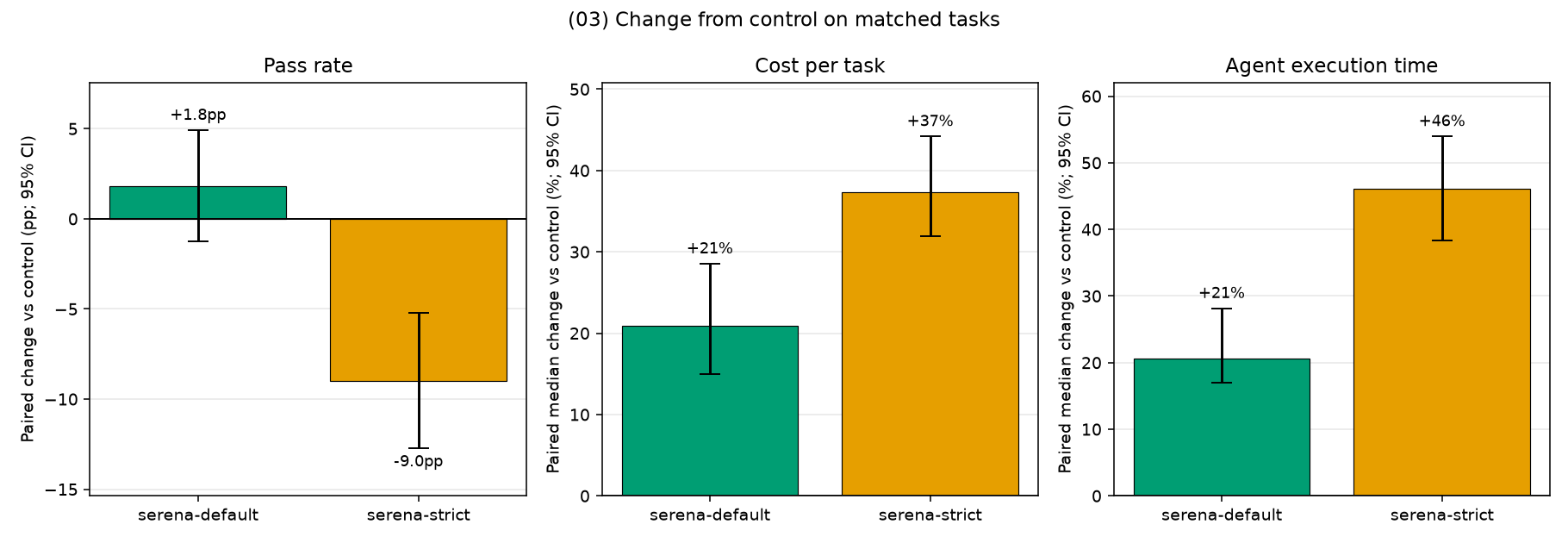
On this benchmark, the default setup didn't deliver on the central claim. It may raise the pass rate slightly, but we can't tell that apart from noise. What it clearly did was make the agent slower and more expensive. Forcing Serena made every measure worse, so strict mode is a downgrade from the default setup.
Where the extra cost comes from
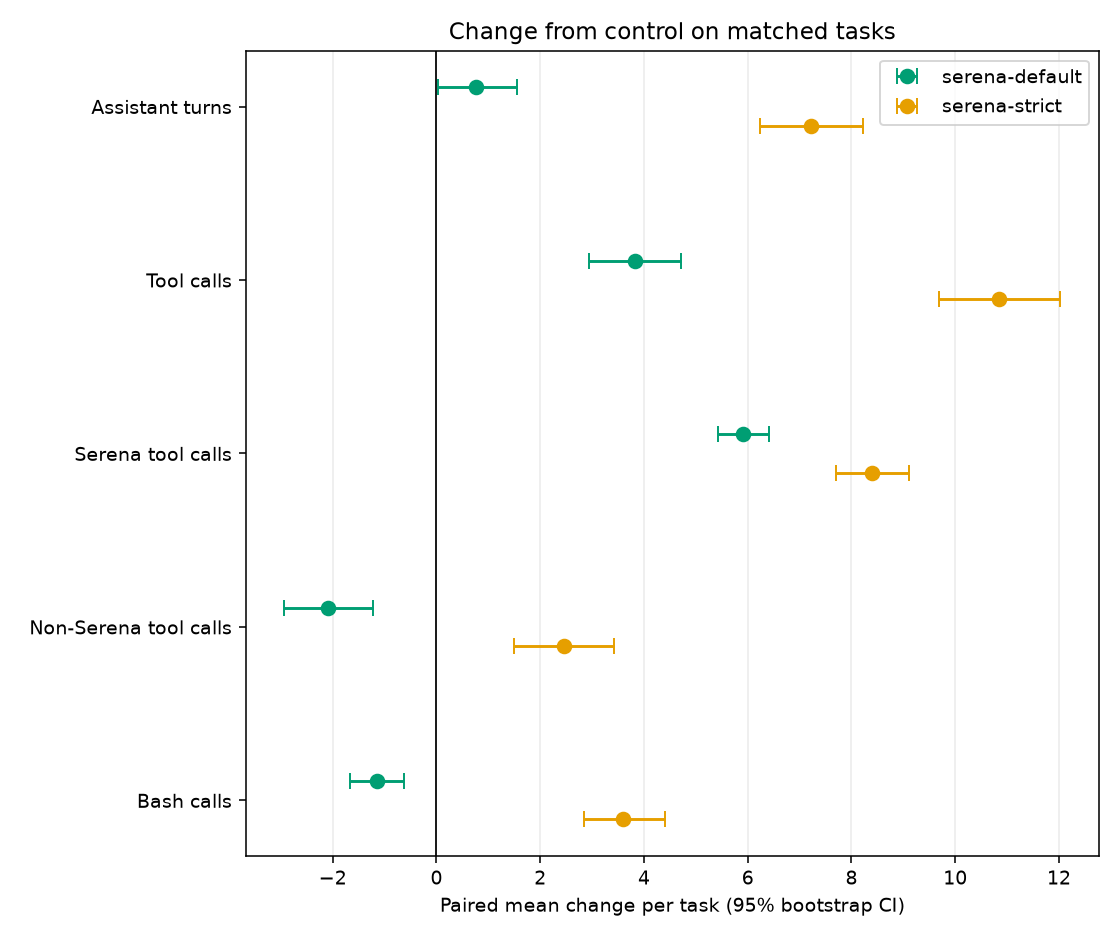
So where do the extra cost and time come from? Serena is meant to replace several generic tool calls with one precise call. In serena-default, it partly does. The agent makes 2.1 fewer non-Serena tool calls (Read, Bash, Write, Edit) per task on average, but 5.9 more Serena calls, for a net 3.8 more tool calls per task. Turns rise by less, 0.8 per task, because the agent often makes several tool calls in one turn. Strict mode adds even more: 8.4 more Serena calls and, instead of falling, 2.5 more non-Serena calls, for 10.8 more tool calls and 7.2 more turns per task.
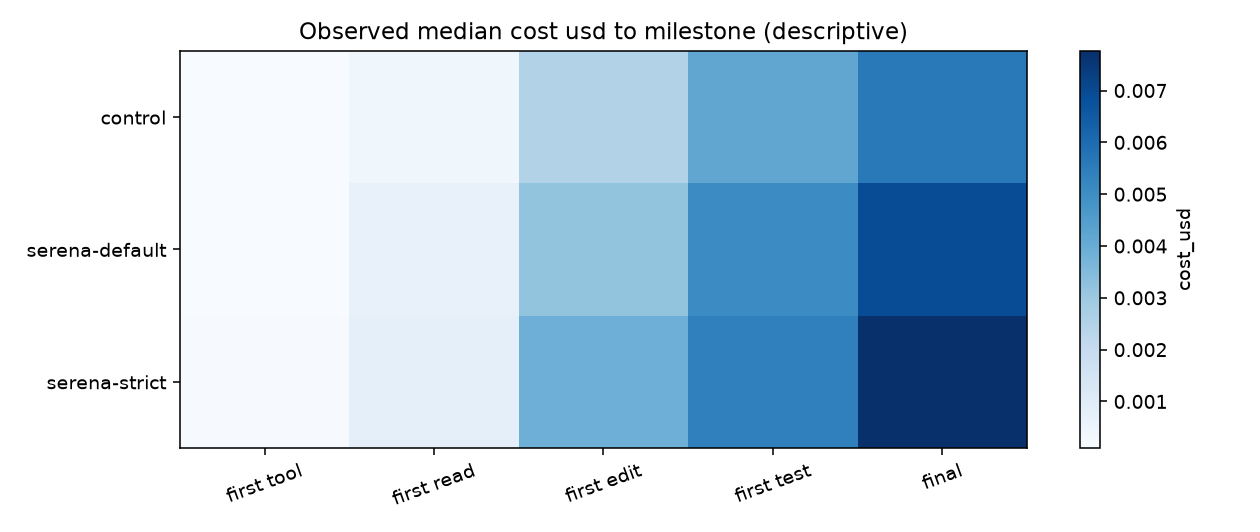
The extra calls come early in the task. We marked a few milestones in each trial: the first tool call, first file read, first edit, first test run, and final answer. Then we measured the cost to reach each one. Both Serena arms reach every milestone after the first tool call later and at higher cost. For the first edit, the typical task costs 22% more to get there in serena-default and 48% more in serena-strict. It is also 9 seconds and 18 seconds slower to get there.
Serena's pitch is that a few precise lookups replace a lot of grepping and reading. For that to pay off, the lookups have to replace something. The next two sections look at what the agent actually did with Serena, and whether it sent less text to the model as a result.
Serena tools called
Here are the Serena tools the agent called in each arm:
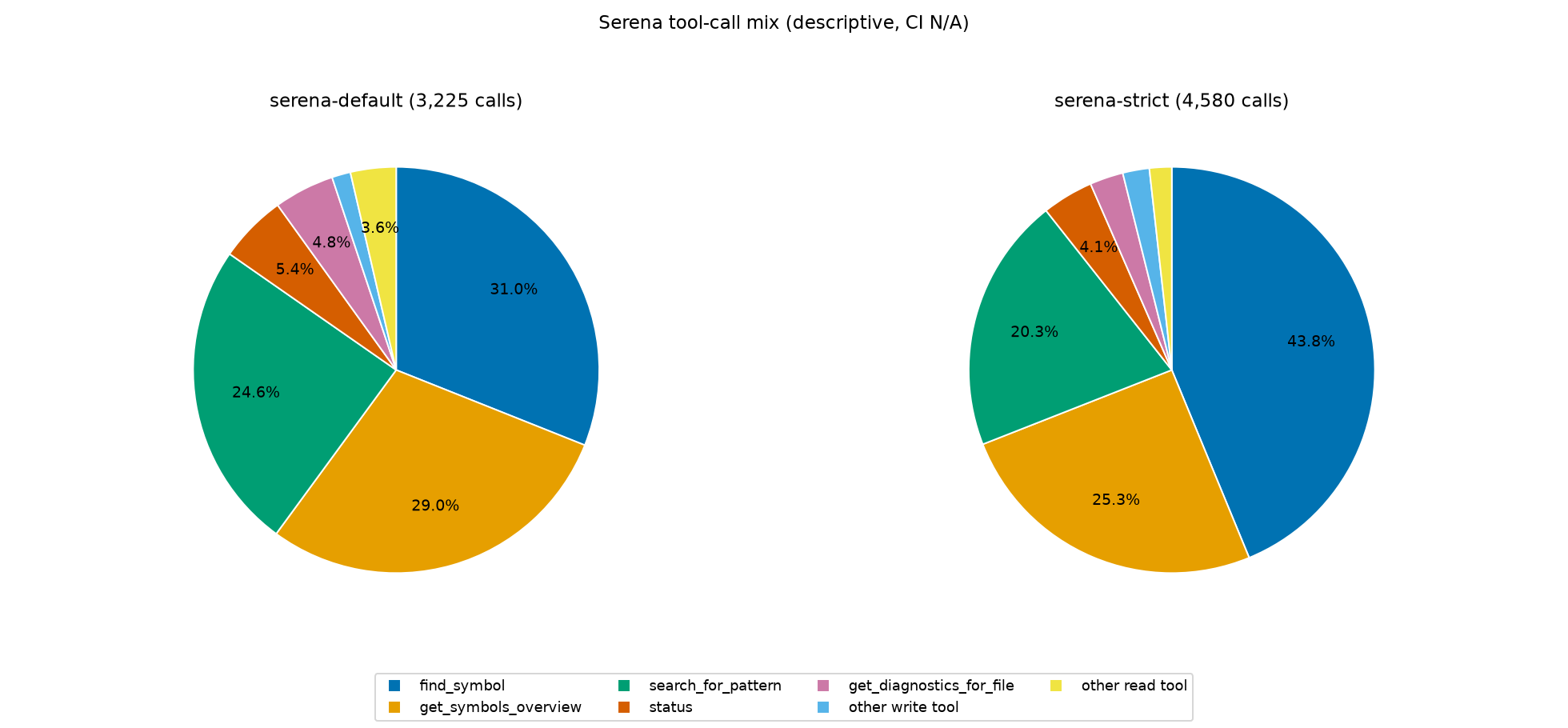
Strict mode made more Serena calls: 4,580 versus 3,225 in the default arm. In both arms, though, the calls were concentrated in just 3 of the 23 available tools: find_symbol, get_symbols_overview, and search_for_pattern. These three account for 85% of Serena calls in serena-default and 89% in serena-strict. Serena also offers 7 code-editing tools, such as replace_symbol_body and insert_after_symbol. Yet 98% of Serena calls in both arms were read-only lookups. For editing, the agent stayed with Pi's own Write and Edit tools.
So in practice, Serena was a lookup tool: the agent used it to find where things are, not to change them.
Serena adds input tokens
Ideally, those lookup tools would return precisely what the agent needs, saving on reading and thus on input tokens. However, the typical task's input tokens went up in every benchmark in strict mode, and in every benchmark except FeatureBench, which stayed within noise, in default mode:
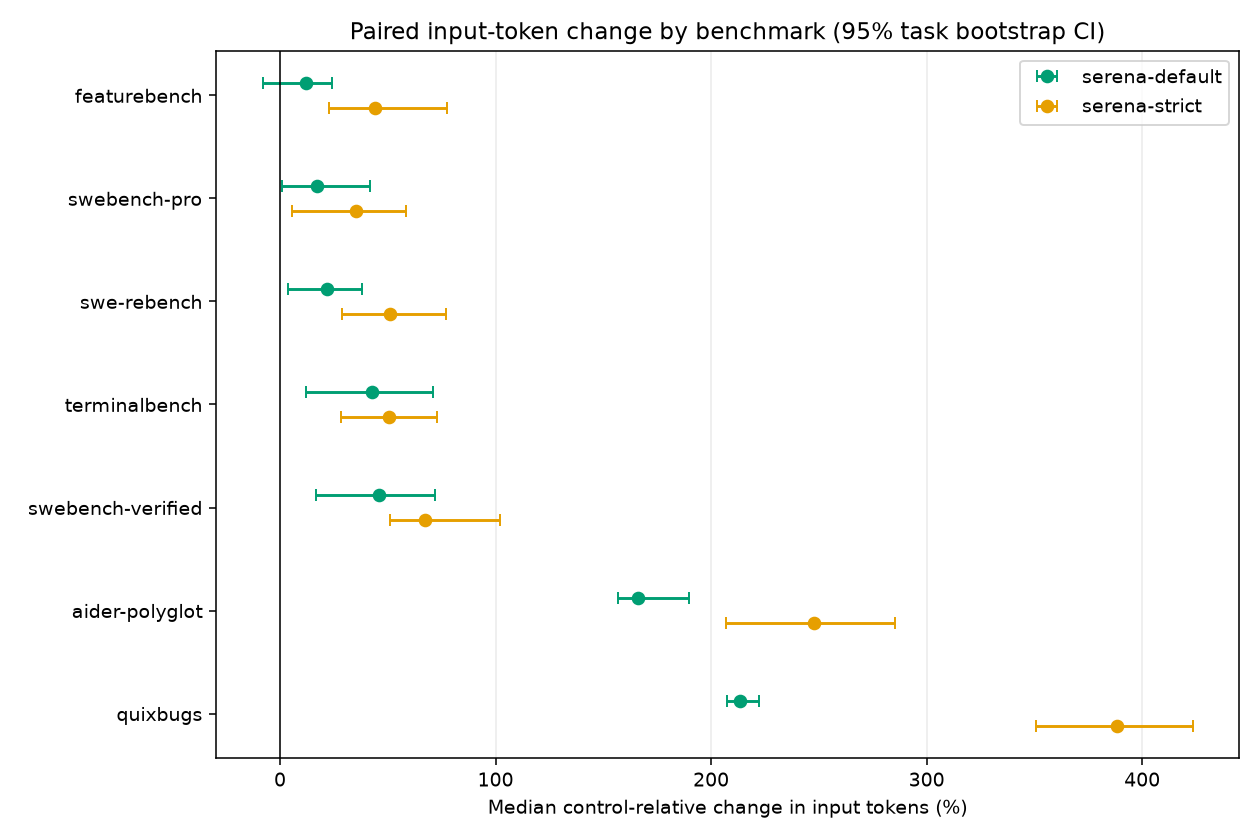
The increase was largest on the small exercises. In serena-default, the typical QuixBugs task used 213% more input tokens and the typical Aider Polyglot task 166% more. These tasks fit in a file or two, so there is little code to navigate and not much for Serena to save. They also pay the most for Serena's fixed overhead. Its tool definitions and instructions add about 1,800 tokens to every request, so the typical first request grows from about 1,500 to 3,300 tokens. The model receives these extra tokens on every turn, whether or not it calls Serena. A typical QuixBugs task sends only about 4,200 input tokens in control across three requests, so this overhead alone roughly doubles its input.
The big repositories are where Serena should help most, but input tokens still rose there. The typical SWE-bench Verified task, from projects such as Django and scikit-learn, used 46% more input tokens in serena-default. Across all benchmarks, input tokens rose much more than cost did (+60% for the typical task, against +21% cost). Two things explain the gap. About 92% of input tokens in every arm came from the provider's prompt cache, which bills them at a tenth of the normal input price. And output tokens, which cost more per token, barely changed in serena-default: +4% for the typical task.
Why strict mode solves fewer tasks
Strict mode's 9.0-point drop in pass rate is uneven across benchmarks. QuixBugs is 15% of the tasks, but it accounts for almost half of the drop:
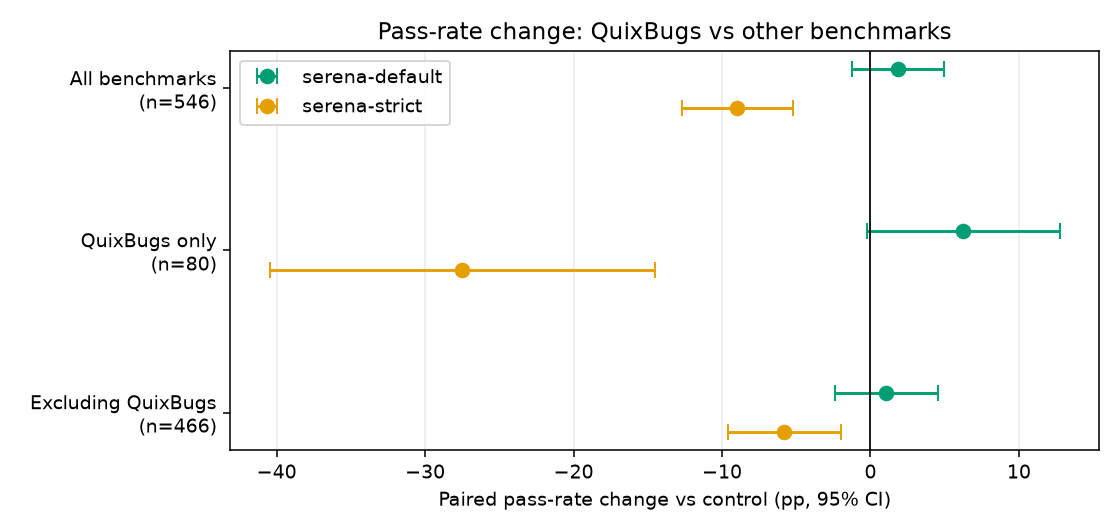
On QuixBugs, strict mode solved 27.5 points fewer tasks than control. The cause is specific to this benchmark. Each task asks the agent to fix one line in a small program and write out the complete fixed file, and the grader checks that exactly one line changed. The programs end with a docstring below the function. Strict mode blocks the Read call, so the agent looks up the function with Serena instead. Serena returns the function's body, but not the docstring below it, because that docstring isn't part of any symbol. The agent then writes the fixed function without the docstring. The fix is correct, but the one-line check fails. This happened on 24 QuixBugs tasks in strict mode, against 3 in control.
Without QuixBugs, strict mode still solves 5.8 points fewer tasks than control (p=0.004). The agent can't read any source file directly for the whole task, and on the large repositories the gate rejects 9 to 21 reads and code searches per task. It also tests less. Outside QuixBugs, it runs a test in 5.4 points fewer tasks than control, and on FeatureBench, the benchmark with the most blocked calls, the share falls from 43% to 24%. We can't show that less testing causes the failures, but both suggest an agent working with a narrower view of the code.
Conclusion
Serena gives the agent 23 IDE-style tools and promises that it will work faster and more efficiently. On this 550-task benchmark, it did neither. With the default setup, the pass rate didn't change meaningfully, while the typical task cost 21% more and took 21% longer. Forcing the agent to use Serena made things worse on every measure: 9 percentage points fewer tasks solved, 37% more cost and 46% more time.
The breakdown explains why. The agent used Serena almost entirely for lookups, and most of those went to three of the 23 tools. It rarely touched the editing tools. Those lookups didn't reduce the text sent to the model. Input tokens rose on almost every benchmark, partly because Serena's tool definitions ride along on every request. Each task gained extra turns and tool calls, and the agent reached its first edit later and at higher cost. The overhead was largest on small tasks, but it was also clear on large, real-world repositories, where code-aware navigation should help most.
We didn't test Serena's paid JetBrains backend, other models, or other harnesses, and Serena may still help on codebases or tasks this benchmark doesn't cover. If you do install Serena, keep the default setup and let the agent decide when to call it. Forcing it made every result worse.
This fits a broader shift in how agents are built. Pi's author argues that read, write, edit, and bash are "all you need for an effective coding agent", because frontier models are already trained to use them. Every extra tool definition is paid for on every request. As models get better at working with those basic tools, a larger toolset has to earn its place, and on this benchmark Serena's didn't.