Stop using MCP, use CLI instead
2026-07-08
AIs are much more useful when they have tools, and MCPs have captured a lot of the hype around tool use. The magic of an MCP is that it allows a 3rd party to develop a tool that can be plugged into any first-party model. So you can use Microsoft MCPs for Claude or Salesforce on Gemini.
The problem becomes that we want to use all those MCPs and how they interact with the LLM's context window. Think of an LLM's context window as short-term working memory, or the maximum number of words it can "hold in mind" at any single moment. When you chat with an AI, this window must contain everything: the system instructions, the tool definitions, the history of your instructions, and the agent responses. If information isn't inside this window, the model simply doesn't know it exists. This is the real constraint on your session length with the AI.
Now for the MCPs. During the initial connection handshake, the AI agent requests a complete manifest of every capability the MCP server supports and then injects the entire catalog of JSON schemas—names, verbose descriptions, and argument types—directly into the LLM's context window. If you connect just a handful of versatile servers for databases, file systems, and APIs, you can easily burn 10-20% of your context window before you even ask a question. This is the context bloat problem: the more tools you connect, the less room there is for your actual instructions and the agent's responses.
I discovered this when I realized MCP servers were collectively eating about 12% of Claude Sonnet 4.5's context. The tools were all useful, and I didn't want to get rid of them. As I discovered, some MCP servers will eat up over 16% of that same context window.
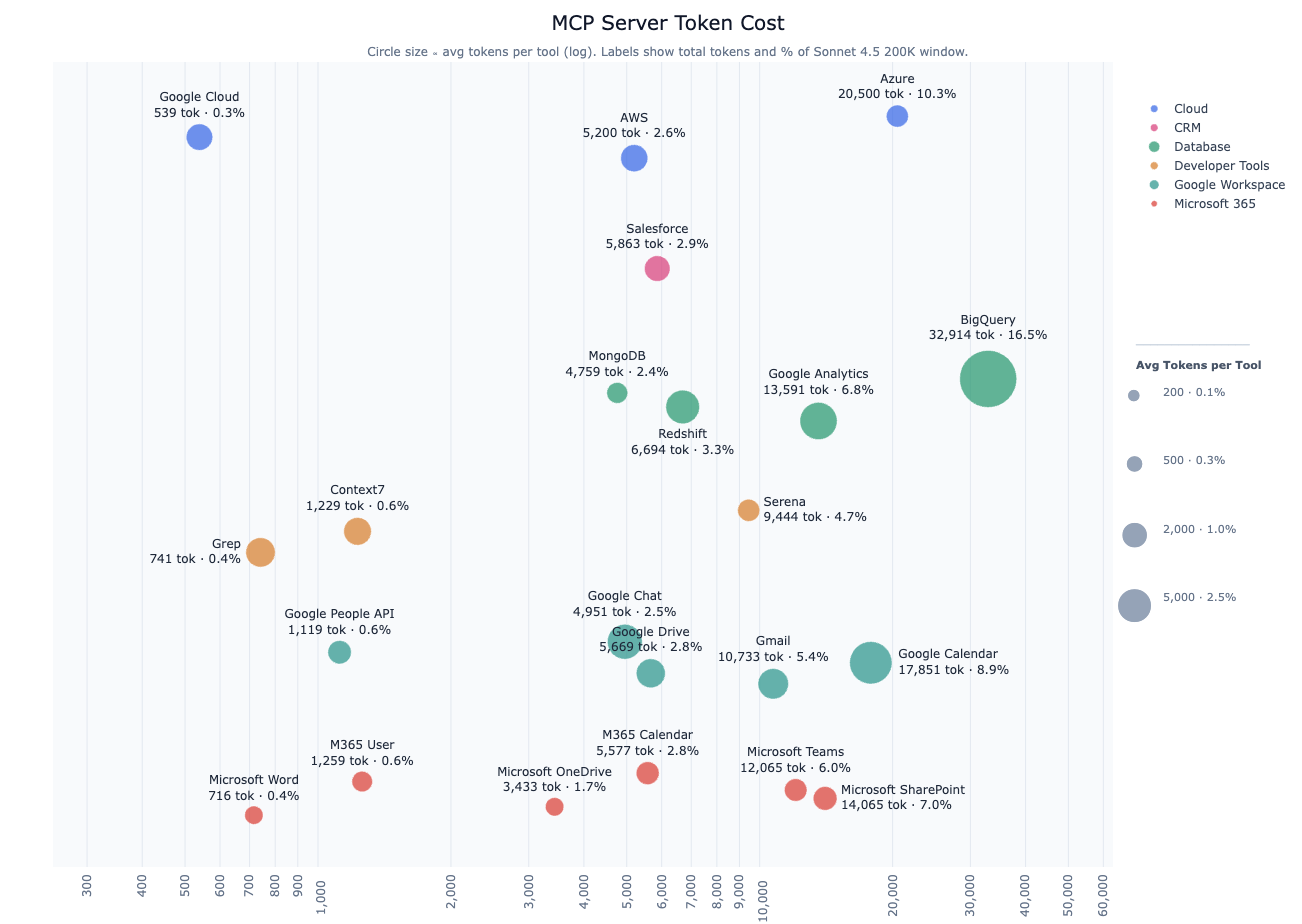
And context bloat costs you money. If billed at API costs, the 10-20% of your context window is at least a $0.03-$0.06 cent tax per query. That's $9-$18 per month for the average user running 10 queries a day or 300 queries per month.
Of course, almost none of your AI sessions require all these tools to begin with. Any given session will use only a small subset of the available tools. So how do we solve this? We could wait for better MCP implementations, but there is a much simpler solution.
To bypass context bloat entirely, forward-thinking developers are turning to one of the oldest and most efficient interfaces in computing: the Command Line Interface (CLI). The AI agents come with access to a secure Bash execution tooling. Instead of interacting with abstract MCP endpoints, the LLM writes raw text commands that the host application executes inside an isolated runtime container or sandbox. This fundamentally flips the architecture: the agent stops acting like a passive consumer of raw data feeds and starts acting like a systems engineer, leveraging native terminal utilities to perform complex tasks right where the data lives.
This shift to a CLI model instantly slashes context bloat on both the input and output side of a tool call.
-
On the input side, a CLI approach solves upfront schema bloat through its naturally hierarchical structure. An MCP reads the entire instruction manual before using the tool (the inefficient context bloat). The CLI reads the table of contents and only reads the section it needs. For example, rather than loading separate MCP tool definitions for every possible billing mutation, an agent can interact with the official Stripe CLI via a unified
stripebase command. If the agent needs to find a specific customer invoice, it evaluates the hierarchy sequentially: running stripe to see core modules, dialing intostripe invoicesto access billing capabilities, and finally executingstripe invoices find --customer=cus_123when it's ready to act. Because the AI dynamically uncovers subcommands and flags only when needed, the vast majority of irrelevant stripe CLI tool schemas never enter the context window. -
On the output side, a CLI empowers the agent to use native system tools to filter large data payloads. Think of the tool as returning a large report. In the MCP, you read the entire report, even if only one page is relevant. In a CLI, you can use native system tools to filter the report down to just the relevant lines. For example, if a logging tool doesn't support custom pagination or specific string matching, an MCP would force a massive, unoptimized data dump straight into the context. With a CLI, we can use system bash tools to elegantly sidestep this by running a command like
grep "error" production.log | tail -n 5, and the underlying operating system does the heavy lifting of parsing a massive file in milliseconds. The LLM receives exactly five lines of high-density, actionable insights, completely eliminating the runtime context explosion that typically derails agentic workflows.
And don't worry if you don't know how to use these commands yourself. The AI can generate correct syntax and flags because it has been trained on a vast corpus of these commands.
Let's not throw the tool baby, out with the MCP bathwater. MCPs introduce significant context bloat that can hinder performance and efficiency. By embracing a CLI-first approach, AI users can empower AI agents to operate more like skilled systems engineers, leveraging native tools and dynamic discovery to minimize context overhead. This not only enhances the agent's capabilities but also ensures that the AI remains agile, efficient, and effective in executing complex tasks without being bogged down by unnecessary data.